Package detail
Six tabs that answer every question you can ask about one package at one version.
The six tabs
Versions
visx-rendered timeline of the full version history the registry returned, with the installed version highlighted. Hover a dot to see release date + stability flag. The fastest way to answer “how stale is this?”.
Vulnerabilities
Every CVE that matches the installed version. Severity badge + advisory id + range that triggered the match + fix version (when known). Links out to OSV + GHSA + NVD for each row.
Malware
malware_reports hits for this (ecosystem, name, version). One row per source:
osv-mal— OSVMAL-*entryghsa-malware— GHSA advisory flagged malwaresocket.dev— Socket alert taggedmalware/backdoortyposquat-heuristic— local heuristic suspicion (usually not confirmed malware)
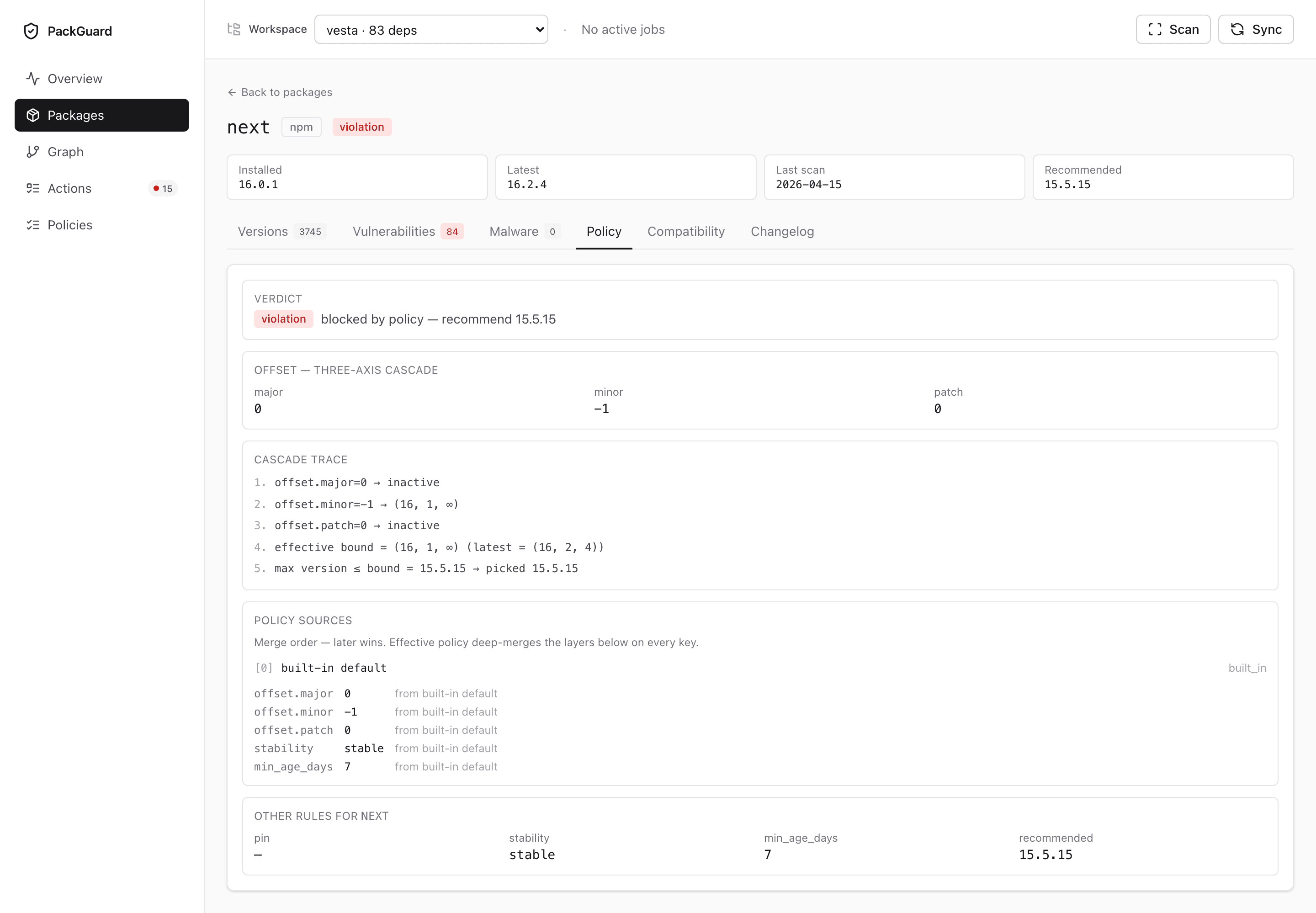
Policy eval
What the effective policy says about this row. Four panels plus a provenance section:
- Verdict — the resolver’s bottom line:
compliant/warning/violation/insufficientwith a one-line rationale.insufficient(purple) means no version satisfied the offset bound and the store has no fallback — distinct from—(“no data cached”). - Offset — three-axis — resolved
major/minor/patchaxes in signed form (the shape you write in YAML), after the monorepo cascade has been merged. - Cascade trace — ordered list of the lex-bound resolver decisions: the effective upper bound
(X, Y, ∞)derived from the offset, themax version ≤ boundthat matched, and the cross-boundary fallback if the target major/minor was empty. When the trace ends ininsufficient, it names the axis that exhausted the candidate pool. - Remediation —
pin/stability/min_age_days/ the finalrecommendedversion, plus any block reasons that vetoed higher candidates.
Below the panels, the Policy sources section lists every .packguard.yml that contributed to the effective policy — file path, role (root / intermediate / local), and a per-key provenance table (which file / line each value came from). Matches packguard report --show-policy output. Use it to debug “why did this workspace get this value?” in a monorepo.
Rows flagged insufficient in the Packages table deep-link straight here via ?tab=policy#cascade.
Compatibility
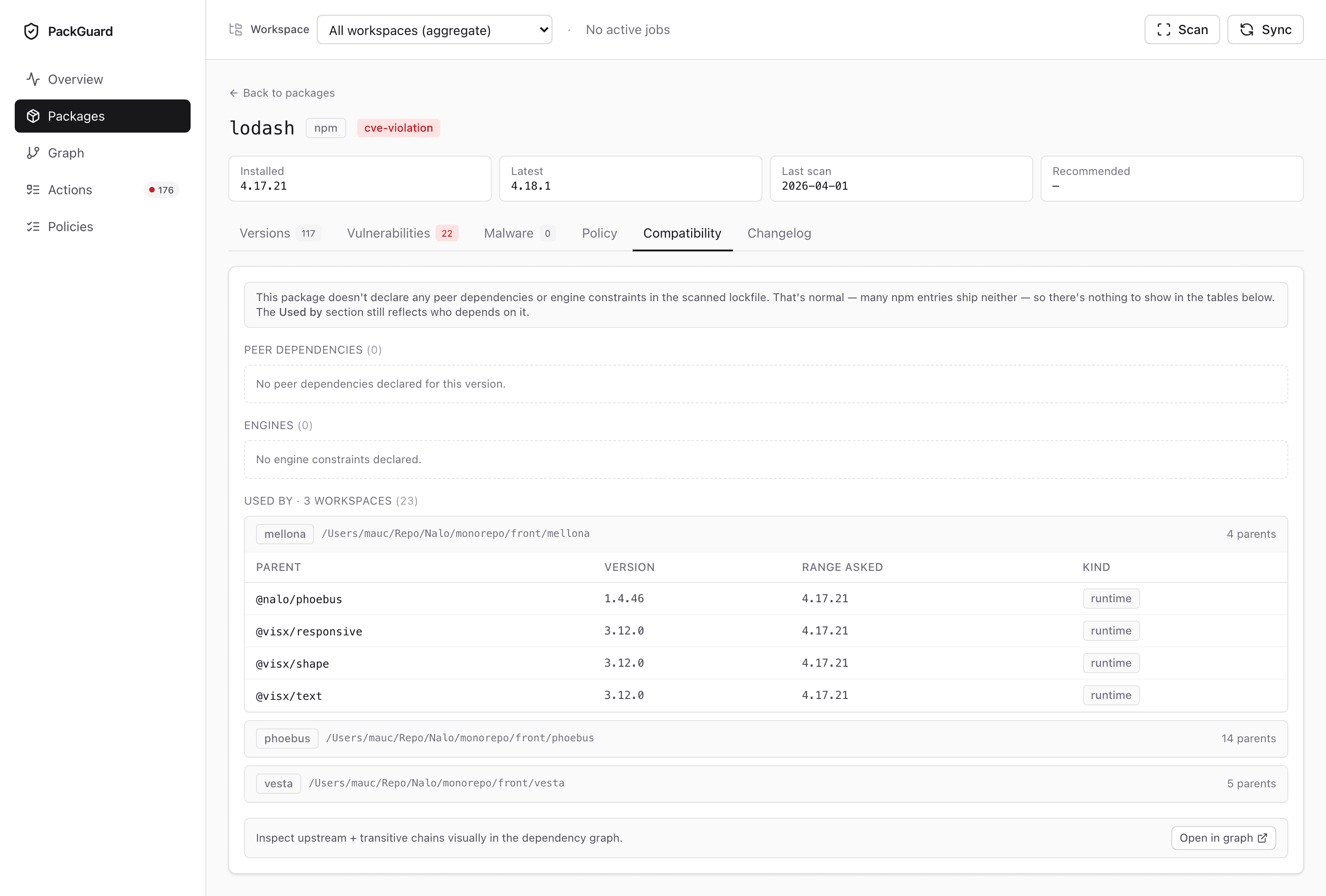
“Which of our workspaces installs this package, and through which chain?” — per-workspace drill-down with the dependency path from each workspace’s root down to this package.
In a monorepo, a shared transitive dep (think lodash) lights up every workspace that pulls it in. The tab answers “how many apps have to move?” at a glance.
Changelog
Registry-provided changelog when available; falls back to a link-out when the registry only exposes per-release metadata. Not every package has good changelog coverage — that’s upstream’s problem.
URL shape
/packages/:ecosystem/:nameThe active tab is ?tab=<name> — bookmarkable and linkable. Useful when referencing a specific view in a Slack thread or an MR description.