Per-project scoping
Monorepos break every tool that assumes “one repo, one dependency tree”. PackGuard is workspace-aware from the scanner all the way to the UI — every list-returning endpoint threads a ?project=<slug> query param, and the dashboard header has two dropdowns that write the active project + workspace into the URL without unmounting the route.
Project vs workspace
Two concepts, two scoping levels. Project = a git repo root, identified by slug. Workspace = a manifest+lockfile path inside a project. See Per-project store / Project vs workspace for the canonical definition, the slug derivation, and the on-disk layout. The rest of this page focuses on the runtime UX — how the selectors compose, how the CLI mirrors them, and how policy + cross-project operations behave.
The workspace boundary
A “workspace” in PackGuard is a path that owns a manifest + a lockfile. In practice that’s:
- A
package.jsonsitting next to apackage-lock.json/pnpm-lock.yaml. - A
pyproject.tomlsitting next to apoetry.lock/uv.lock. - Or a
requirements*.txton its own (declared-only mode).
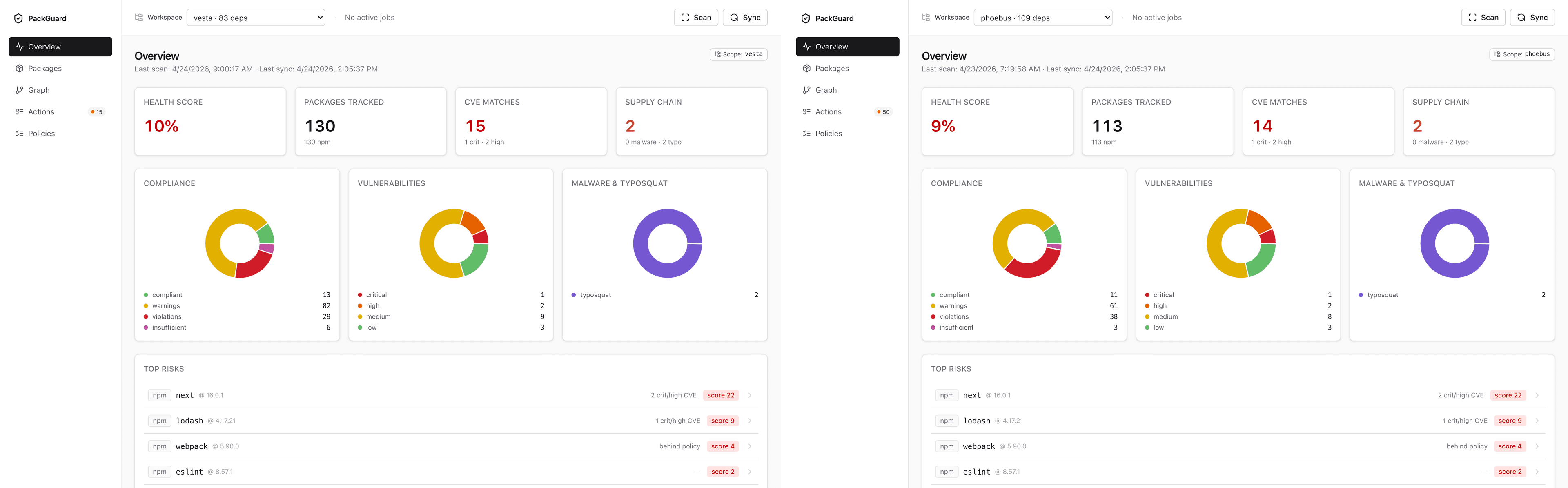
packguard scan <path> walks the path recursively and records one entry per (workspace, ecosystem) pair in the project store. A monorepo with an app-web, an app-api, and a worker-ingest ends up with three entries per ecosystem — and the Overview donuts reflect that.
The scope selectors (project + workspace)
Since v0.6.0 the dashboard header carries two selectors that compose:
-
ProjectSelector(left) — flat list of every registered project, with the active one bolded and the rest sorted bylast_scan DESCthencreated_at DESC. Each row shows the project name, the canonical path as a tooltip, and a relative “last scan” timestamp (“2h ago”, “3d ago”, “never scanned”). The footer exposes a+ Add new projectbutton that opensAddProjectModal. Switching project writes?project=<slug>and persists tolocalStorage.packguard.projectScope. -
WorkspaceSelector(right) — the same tree view introduced in v0.5.0, with longest-common-prefix collapse, fuzzy search, and persisted folder state underlocalStorage.packguard.workspace-tree-collapsed. As of v0.6.0 it’s scoped to the active project: the tree only shows workspaces inside the currently-selected project. The popover footer still carries a+ Scan new pathbutton for the Add-workspace modal. AnAggregateentry at the top of the tree returns the intra-project union (every workspace inside this project, none outside).
The URL contract is dual:
?project=<slug>&workspace=<absolute path>Both segments are independent — switching project doesn’t reset the workspace param, and bookmarking a URL with both bookmarks both. Two browser tabs → two (project, workspace) pairs → independent dashboard state.
Backcompat for v0.5 bookmarks: ?project=<absolute path> (the old single-level form) is still accepted in v0.6. The dashboard’s useLegacyProjectRedirect hook walks every known project root, picks the deepest ancestor of the legacy path, and rewrites the URL in place to ?project=<slug>&workspace=<path> with a one-shot Sonner toast ("URL updated"). The back button still works; the scope the user wanted is preserved.
Adding a project from the dashboard
A fresh PackGuard install — no projects registered yet — renders a one-pane gate (EmptyProjectGate) instead of the dashboard chrome. The gate carries a single + Add your first project CTA that opens the same AddProjectModal as the ProjectSelector footer.
Submit an absolute path; PackGuard walks up to find the enclosing .git/ root, slugifies it, registers the project in projects.db, and runs the recursive workspace discovery (Phase 9a). On success the modal switches you to the new project’s scope and closes; on failure (path doesn’t exist, isn’t absolute, isn’t inside a git repo, or is already registered) the error surfaces inline so you can edit + retry without re-opening.
The boot flow is ref-guarded: the most-recent auto-pick fires once per mount, so registering a new project (which becomes most-recent the moment it lands in the registry) does not yank scope away from whatever the modal just set.
The CLI mirror
Every list-returning CLI command accepts the same selector as a flag, and as of v0.6.0 the canonical form is the slug:
packguard report --project Users-x-Repo-Foo-monorepo
packguard audit --project Users-x-Repo-Foo-monorepo
packguard graph --project Users-x-Repo-Foo-monorepo

# Legacy path form is still accepted (deprecated — emits a warning,
# walks up to .git/ to resolve the slug):
packguard report --project /Users/x/Repo/Foo/monorepo/apps/web
With no --project flag, the CLI walks up from cwd looking for a .git/ ancestor and resolves the matching project slug automatically (Phase 14.2c). If cwd isn’t inside any registered project, the CLI prints an explicit banner on stderr:
warning: --project not specified, no .git/ ancestor matched a registered slug.
         registered slugs: Users-x-Repo-Foo-monorepo, Users-x-Repo-bar-cli
         pass --project <slug> to scope, or run `packguard scan <path>` to register a new one.
Per-workspace .packguard.yml
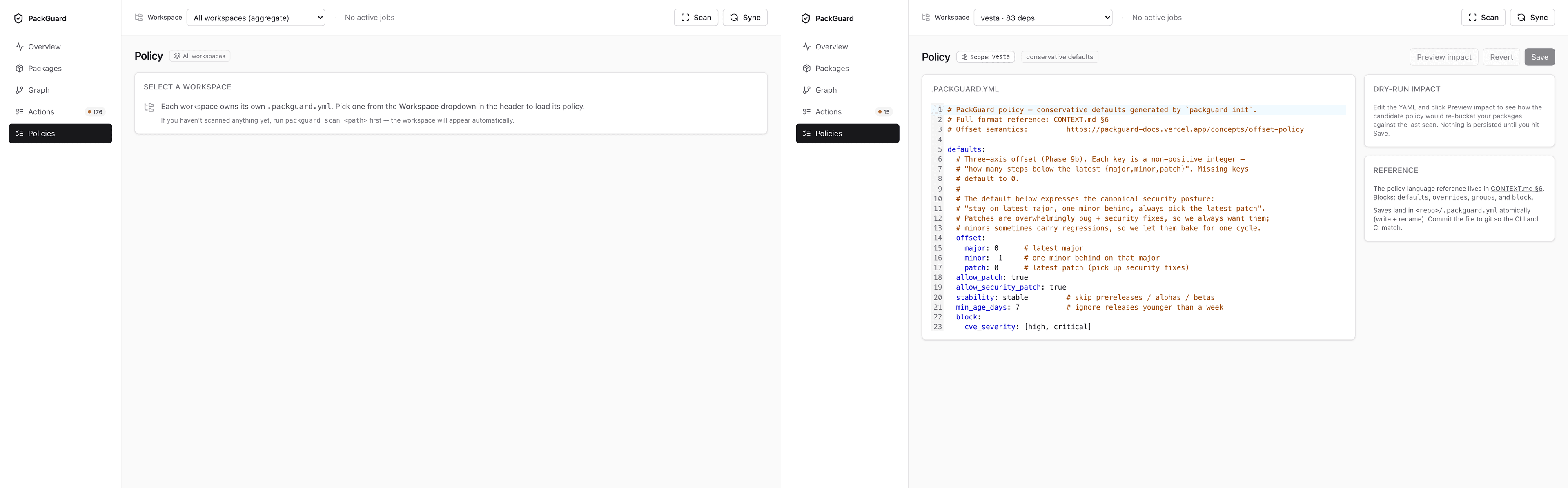
Each workspace can own its own .packguard.yml. When one exists, it composes with any parent .packguard.yml between the workspace and the repo root via a deterministic cascade (deep-merge, walk-stop on .git/ or root: true). When no .packguard.yml exists anywhere along the chain, PackGuard uses the conservative defaults baked into the binary.
The cascade keeps policy flexible in a monorepo — a repo-root .packguard.yml can set shared rules (block.cve_severity, block.malware) once, while each workspace overrides only what it needs locally. To see exactly which file contributed which key, run packguard report --show-policy <workspace> — it prints the resolved policy with per-key provenance (file + line).
See offset-policy / Policy cascade across a monorepo for the full merge rules, extends: directive, and walk-stop semantics.
The Used by drill-down
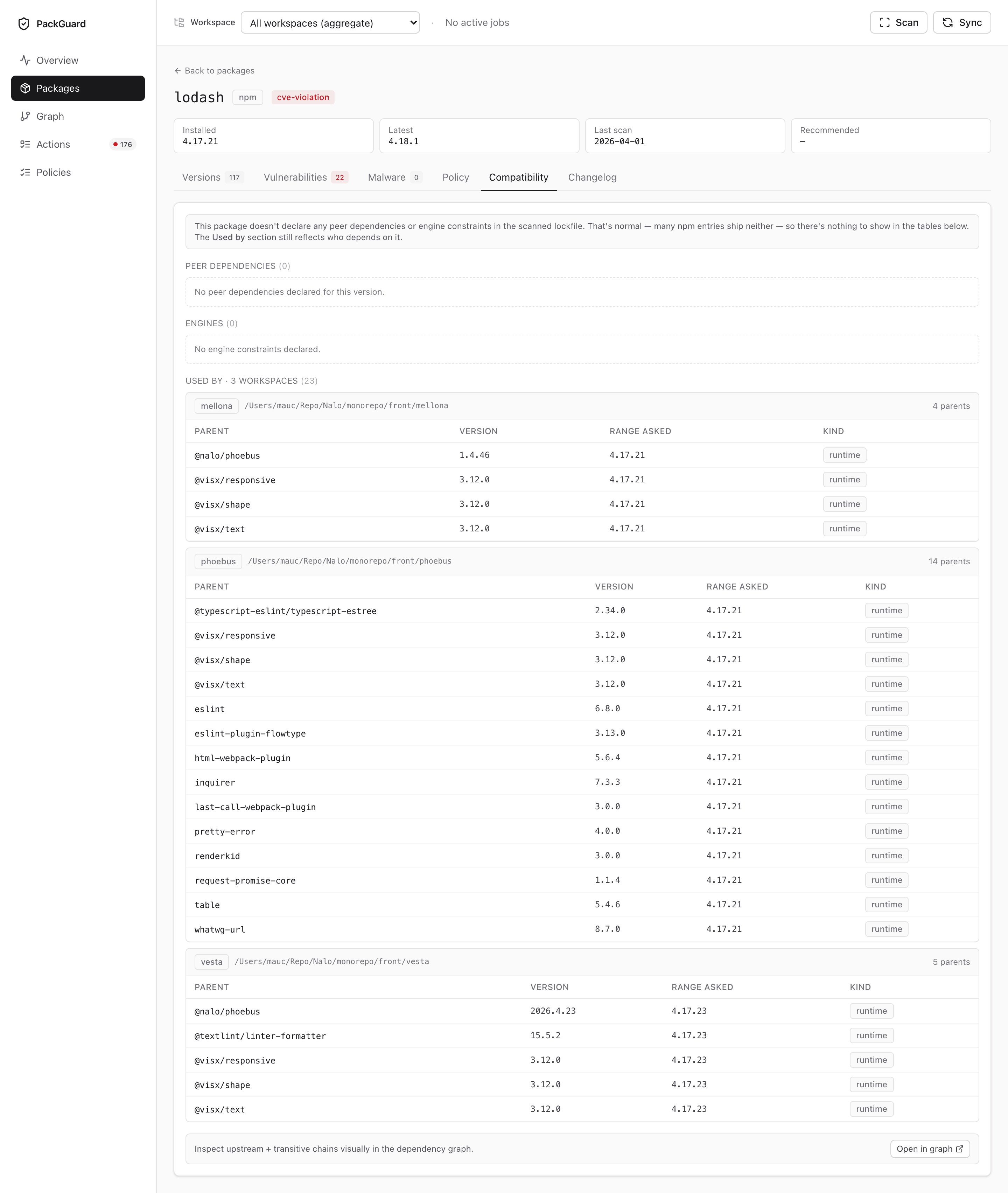
In a monorepo, a single package version can be installed across multiple workspaces at different depths in the graph. The package-detail Compatibility tab groups installations by workspace + shows the dependency path from each workspace’s root down to the package — useful when triaging “this CVE — how many of our apps have to move?”.
Cross-workspace operations
A few operations are intentionally not scoped:
sync— intel refresh is global to your install (shared across every project, written to~/.packguard/intel/intel.db). Running it once populates the cache for every project that touches npm / PyPI. The watched-package list it consumes is unioned across every per-project store.scans— the “list what I know about” command returns every(slug, path, ecosystem)triplet across every per-project store regardless of scope. That’s how you discover what projects + workspaces exist on disk.- The Overview aggregate view — omitting
?project=falls back to the cross-project aggregate (concatenation of every project’s overview). Useful for platform / security-team dashboards; noisy for product teams. Inside the active project, omitting?workspace=is the intra-project aggregate.
The header Scan button is scoped — it always targets the active project’s path. To scan a path that isn’t yet registered, either register it via AddProjectModal first, or use packguard scan <path> from the CLI (which auto-registers under the right project slug or under _default_).
Related
- Per-project store — architecture: registry, intel split, on-disk layout, migration v0.5 → v0.6.
- Dashboard: Overview — scope badge top-right of every page.
packguard scans— enumerates every(slug, path, ecosystem)the project stores know about.- Dashboard: Policies — the workspace-aware YAML editor.