Actions
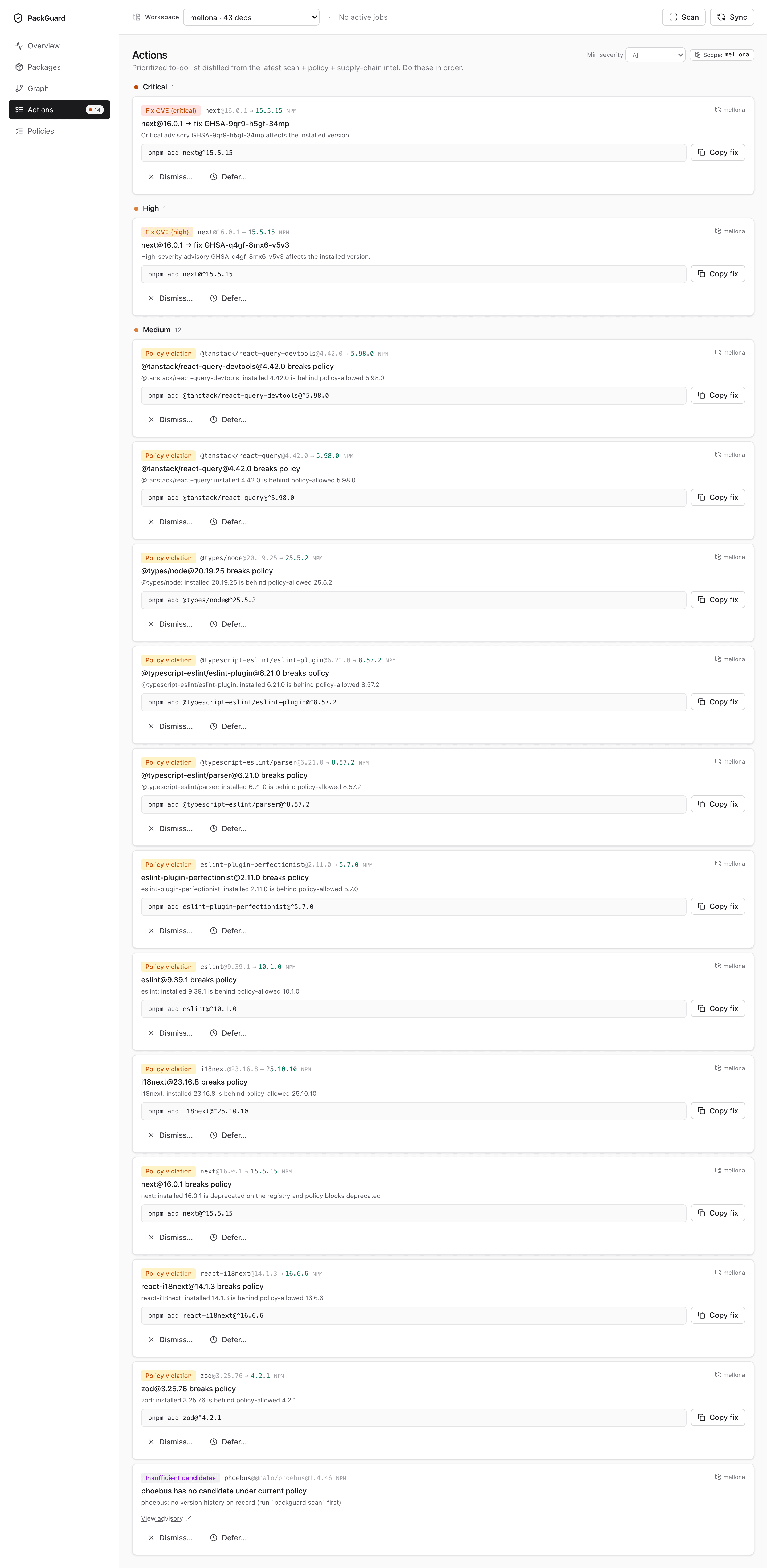
The “what should I do next?” page. Every row PackGuard has flagged — CVE, malware, typosquat, policy violation, insufficient resolver result, stale sync — turns into a copyable fix.
Layout
Header badge. The top-nav Actions link carries a count of active (not dismissed, not deferred) actions with a severity dot — red if ≥1 Malware/Critical is present, orange for High, yellow for Medium, none when zero actions.
Global banner. Workspace-agnostic actions (RefreshSync, RescanStale) render in an amber banner at the top of the page — separate from the per-workspace list. They’re always relevant regardless of the active scope.
Per-severity groups. Cards grouped by severity descending: Malware → Critical → High → Medium → Low → Info. Each group collapses/expands with a count in the header. Empty groups are omitted — if no malware action exists, the Malware section isn’t rendered.
Card anatomy
| Element | Meaning |
|---|---|
| Severity badge | Malware purple · Critical red · High orange · Medium yellow · Low gray · Info blue |
| Kind label | Human-readable: “Fix CVE (critical)” · “Clear violation” · “Whitelist typosquat” |
| Target | ecosystem:name@installed-version (mono) |
| Arrow badge | → recommended-version when PackGuard has a bump target |
| Explanation | One-line rationale tying the action to the underlying advisory / policy rule |
| Command block | Mono, package-manager-aware (pnpm add X@^Y · poetry add X@^Y · uv add 'X>=Y,<Z' · …) + [Copy] button |
| Fallback CTA | When no fix command exists (no recommendation, no fix upstream), the card shows a “Voir advisory →” link that deep-links to the package detail’s Vulnerabilities tab |
Dismiss / defer / restore
Right side of each card, three lightweight actions:
Dismiss— inline popover with an optional reason field. Submit writes to the SQLiteaction_dismissalstable and the card enters a desaturated state with aRestorebutton in place of the three dots.Defer 7d— button with a days-picker menu (3 · 7 · 14 · 30). The card disappears from the default view and resurfaces on the configured date. Toggle “Show deferred” to see them inline with a countdown.Restore— un-dismiss / un-defer, returns the card to the active list.
Dismissals persist server-side, so the CLI respects them too: packguard actions won’t surface an action you dismissed in the dashboard, and packguard actions dismiss <id> is reflected in the UI on next refresh.
Copy-to-clipboard
Clicking Copy on a command uses navigator.clipboard.writeText() — no external toast library, the feedback is a 2-second inline “Copied” on the button. Paste straight into a terminal, run, commit.
URL filters
Every filter writes to the URL, so bookmarking / sharing preserves the view:
| Param | Effect |
|---|---|
?project=<path> | Scope to a single workspace. Global actions (RefreshSync / RescanStale) ignore this and always render in the top banner. |
?min_severity=<level> | Drop groups below the threshold (malware · critical · high · medium · low · info). |
?show_dismissed=true | Include dismissed cards inline, with a Restore button. |
?show_deferred=true | Include deferred cards, annotated with their countdown. |
Empty states
- No active actions, no dismissed, no deferred → “All clear — no pending actions for this workspace.” with a subtle link back to Overview.
- No active, but some dismissed / deferred → same hero message + “Show dismissed (N) · Show deferred (N)” toggles to pull them in.
- Store empty (fresh clone) → same CTA as other pages, pointing at
packguard scan.
Loading & error states
- Loading: skeleton cards (3-5) on the first fetch per scope. Subsequent scope switches reuse TanStack Query’s cache.
- Error: red banner with the HTTP message +
Retry. The server never returns a partial list — any failure aborts the fetch.
CLI mirror
The same data ships through packguard actions with table / json / sarif formats. Same priorities, same ids, same dismissals. The CLI is the canonical surface for CI; the dashboard is the canonical surface for review sessions. They share the store, so dismissing on one side is immediately visible on the other.
Related
packguard actions— CLI equivalent, same data, three formats.- Packages — the full table behind the actions.
- Package detail — the drill-down when
Voir advisory →fires.